



One Platform to Run, Monitor, and Measure Outbound Call Campaigns
Running a campaign to thousands of customers is about more than dialing numbers. Teams must decide who to call, make sure agents are not left waiting for ringing tones, follow up on failed calls, and report the results. When all of this is scattered across spreadsheets, dialer apps, and chats, campaigns easily leak along the way.
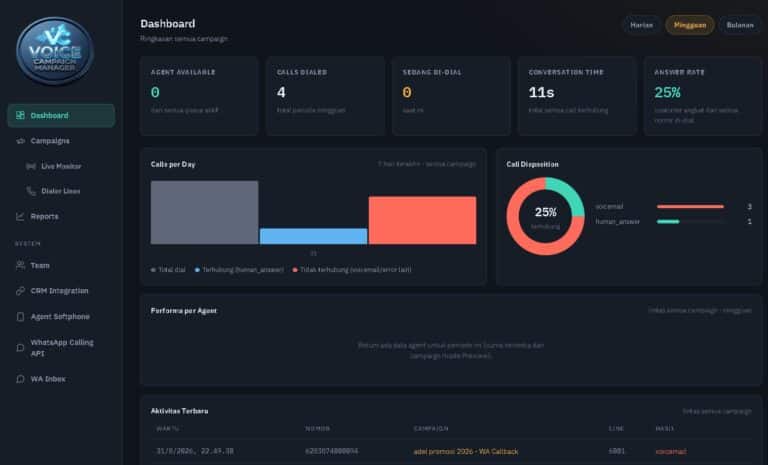
Voice Campaign Manager (VCM) from SolusiPBX is an outbound campaign management system that integrates directly with your 3CX PBX. Contact preparation, call execution, real-time monitoring, follow-up, and reporting all run in a single flow.
What Can VCM Do?
- Live Monitor: Track campaign and call activity in real time. Supervisors know who is on a call, how many calls are running, and which campaigns need attention.
- Dialer Lines: Manage outbound call lines, including PSTN and WhatsApp Calling, from one place.
- Agent Softphone in the browser: Agents make and receive calls directly from the browser, with no complicated installation and no dedicated phone device. Ideal for teams working from the office or remotely.
- Voicemail Detection (AMD): In predictive mode, the system calls customers first. Calls that reach voicemail are filtered out automatically, and only calls answered by a human are passed to agents. Results can be monitored in the Call Disposition menu (human answer vs. voicemail).
- WhatsApp Fallback: Contacts who could not be reached after the maximum number of attempts are not simply discarded. The system sends a confirmation message via WhatsApp. If the customer agrees, the contact is marked “Approved” and can be called again through a new campaign. Follow-up calls happen only after the customer’s explicit consent, keeping outbound communication courteous and ethical.
- CRM Integration: Customer data and call activity sync with your external CRM, so teams do not need to re-enter data manually.
- Scheduling and call history tracking: Schedule outbound calls so campaigns run in a focused way, then review the history of every call for evaluation.
- Reports: Summaries of campaign and agent performance to measure and improve your next campaign.
How Does VCM Work?
- Set up the campaign. Define the contacts, call lines, and schedule.
- Run the calls. The system auto-dials and AMD filters out voicemail.
- Connect to an agent. Only calls answered by a human go through to agents.
- Follow up on failed calls. WhatsApp Fallback reaches contacts who could not be connected.
- Measure the results. Live Monitor, Call Disposition, and Reports show campaign performance.
Business Benefits
- More effective agent time. Agents talk to customers instead of waiting for ringing tones.
- Fewer lost prospects. Failed calls still have a follow-up path through WhatsApp.
- More focused campaigns. Schedules, lines, and targets are recorded in one system.
- Everything monitored in one place. Supervisors see campaign conditions without switching applications.
- No need to replace your systems. VCM connects to the PBX and CRM you already use.
VCM, Predictive Dialer, or Call Center: What’s the Difference?
- Predictive Dialer is the auto-dial feature in 3CX that connects agents to calls that have been answered.
- Cloud Call Center handles inbound calls, queues, and customer service.
- VCM is the campaign management layer on top of both: it sets up campaigns, monitors them, follows up on failed calls, and reports the results.
Frequently Asked Questions
Does VCM replace my PBX system? No. VCM works alongside your existing 3CX PBX.
Can customers refuse to be contacted again? Yes. Follow-up calls via WhatsApp are made only after the customer gives consent.
Do agents need to install an application? Not necessarily. Agents can use the softphone directly in the browser.
Can it connect to our CRM? Yes, VCM supports integration with external CRMs.
Get Started with VCM
Want to see VCM running on your campaigns? The SolusiPBX team is ready to help, from needs analysis to an integration demo with 3CX.
Contact us at +62 21 5011 1266 or via WhatsApp.
Read also: