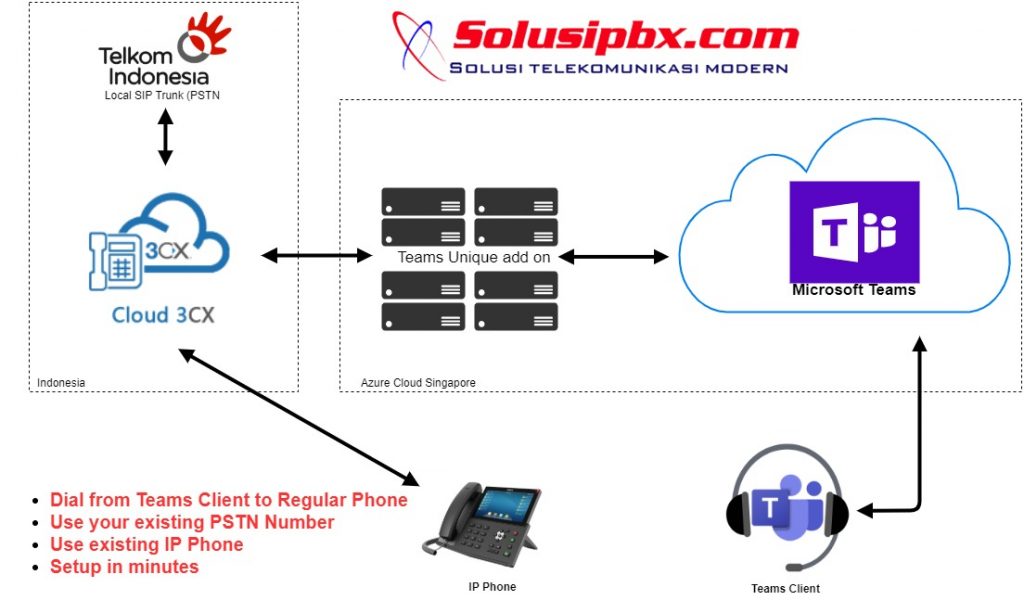
If you already have an IP PBX and Microsoft Teams, you can get the most out of them by integrating the IP PBX system and Microsoft Teams. Combining traditional calling features from the IP PBX with Microsoft Teams will help companies unify their voice communication in the best possible way.
This IP PBX and Microsoft Teams integration uses the Cloud Teams Unique add-on service, so that the IP PBX and Microsoft Teams can communicate with each other. The benefits include:
- No additional hardware is needed, because the Cloud Teams Unique add-on service is already hosted in the Microsoft Azure cloud.
- Receive and place calls directly from the Microsoft Teams app
- Domestic PSTN: uses your existing phone lines, so you can keep using your current office phone numbers.
- Least call route: if you have more than one phone connection, you can choose the most economical route for placing calls.
But what do you need to prepare on the Microsoft Teams side?
If you are a Microsoft Office 365 user on the Basic, Standard, or Premium plan, what you need is the “Common Area Phone” license from Microsoft.
If you already have an E1 and/or E3 plan, you only need an additional Phone System license.
If you are on an E5 plan, you do not need an additional license, because this plan already includes a Phone System license.
You can also connect your Analog Line, ISDN, or on-prem SIP Trunk to Microsoft Teams
If you need more information, please contact us