



WebRTC SBC Gateway Integration for Flutter

Updated on September 30, 2026
4 min read
This documentation is intended for developers connecting a Flutter WebRTC mobile app (Flutter – Android/iOS) to the SolusiPBX WebRTC SBC Gateway infrastructure. This gateway acts as the signaling bridge and media anchor between the WebRTC protocol (mobile app side) and the PBX Core (SIP backend side).
1. Architecture & Connection Flow #
The WebRTC SBC Gateway acts as a signaling translator and secures the media path (media anchor). The communication flow is designed as follows:
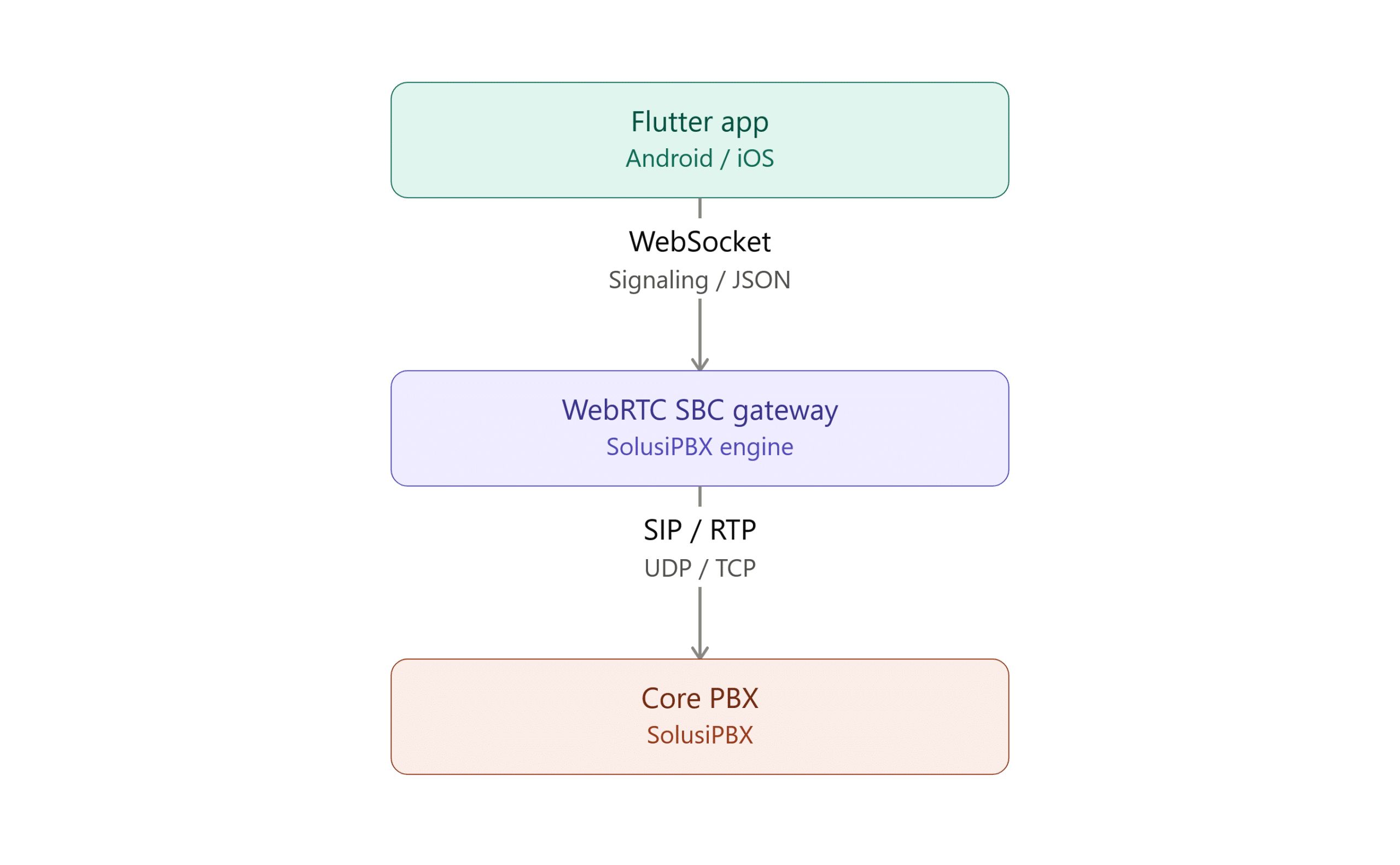
- Signaling: The Flutter app uses a WebSocket Secure (
wss://) connection to exchange JSON data (SIP registration, handshake, and SDP Offer/Answer negotiation). - Media Stream (Audio/Video): The voice stream is encrypted with SRTP/DTLS between the Flutter app and the WebRTC SBC Gateway, then forwarded as standard RTP to the PBX Core.
2. Requirements & Dependencies (Flutter) #
Add the following core libraries to your Flutter project’s pubspec.yaml file to handle the Flutter WebRTC integration and WebSocket connection.
YAML
dependencies:
  flutter:
    sdk: flutter
  # Core library for WebRTC processing (Audio/Video)
  flutter_webrtc: ^0.12.0
  # WebSocket client for signaling communication to the Gateway
  web_socket_channel: ^2.4.5
Platform Permission Configuration #
-
Android: Make sure
minSdkVersioninbuild.gradleis at least 21. Add the following permissions toAndroidManifest.xml:
XML
<uses-permission android:name="android.permission.RECORD_AUDIO" />
<uses-permission android:name="android.permission.CAMERA" />
<uses-permission android:name="android.permission.INTERNET" />iOS: Add microphone and camera access descriptions to ios/Runner/Info.plist:
XML
<key>NSMicrophoneUsageDescription</key>
<string>This app needs microphone access to make phone calls.</string>
<key>NSCameraUsageDescription</key>
<string>This app needs camera access to make video calls.</string>
3. Gateway Endpoint Parameters #
Endpoint details used to initialize the connection to the SolusiPBX Gateway:
-
SBC WebSocket URL:
wss://sbc.solusipbx.com:8989(adjust to the domain/port of the gateway you were given) -
WebSocket Protocol:
janus-protocol(required sub-protocol for the handshake) -
Service Module Identifier:
janus.plugin.sip(internal module providing SIP service)
4. Integration Steps & JSON Payloads #
Communication between Flutter and the SBC Gateway is based on JSON-RPC over WebSocket.
⚠️ IMPORTANT FOR DEVELOPERS: The SolusiPBX WebRTC SBC Gateway’s signaling protocol uses a specific JSON-RPC standard. Because of this, the
"janus"key at the root of the JSON payload is mandatory at the system syntax level and must not be renamed, or the Gateway Engine won’t recognize the request.
Step 1: Open the WebSocket Connection & Session #
The Flutter app must open a stable socket connection and create a Gateway Session.
Dart
import 'package:web_socket_channel/io.dart';
final channel = IOWebSocketChannel.connect(
  Uri.parse('wss://sbc.solusipbx.com:8989'),
  protocols: ['janus-protocol'],
);
Send this payload to create a new session:
JSON
{
  "janus": "create",
  "transaction": "tx_create_session_01"
}
The SBC Gateway will return a response containing a session_id, which you must save for the next step.
Step 2: Activate the SIP Service Module #
Use the session_id you received to attach to the SIP service module.
JSON
{
  "janus": "attach",
  "session_id": 123456789,
  "plugin": "janus.plugin.sip",
  "transaction": "tx_attach_sip_01"
}
The Gateway will return a response containing a handle_id. This ID represents the specific communication channel for your phone extension.
Step 3: SIP Extension Registration (Register Extension) #
Send a register command so the WebRTC SBC Gateway registers the account with the SolusiPBX Core PBX.
JSON
{
  "janus": "message",
  "session_id": 123456789,
  "handle_id": 987654321,
  "transaction": "tx_sip_register_01",
  "body": {
    "request": "register",
    "username": "sip:[email protected]",
    "secret": "S3cretP4ssword",
    "proxy": "sip:core-pbx.solusipbx.internal",
    "refresh": true
  }
}
Step 4: Making an Outbound Call #
To place a call, the Flutter app creates a local PeerConnection object via flutter_webrtc, generates an SDP Offer, then sends it to the Gateway inside a jsep object.
JSON
{
  "janus": "message",
  "session_id": 123456789,
  "handle_id": 987654321,
  "transaction": "tx_outbound_call_01",
  "body": {
    "request": "call",
    "uri": "sip:[email protected]"
  },
  "jsep": {
    "type": "offer",
    "sdp": "v=0rno=- 123456..." // SDP string generated by flutter_webrtc
  }
}
5. Connection Management & Best Practices #
Session Keep-Alive (Heartbeat) #
The WebRTC SBC Gateway needs a heartbeat mechanism to keep the session from timing out. Developers must send a periodic ping every 25–30 seconds using this format:
JSON
{
  "janus": "keepalive",
  "session_id": 123456789,
  "transaction": "tx_keepalive_rand"
}
STUN/TURN Configuration (ICE Servers) #
When initializing RTCConfiguration in flutter_webrtc, developers must include the SolusiPBX STUN/TURN servers. This is essential to ensure media (audio/video) can traverse mobile networks or Wi-Fi networks protected by strict NAT/Firewall rules, preventing one-way audio or no-audio issues.