
Comply with PCI DSS & HIPAA Standards: An Easy Way to Manage Phone System Audit Logs with 3CX Remote Syslog
For companies in the financial sector, fintech, e-commerce, and healthcare services, compliance with global regulations such as PCI DSS (for payment card data security) and HIPAA (for protecting patients’ medical data) is a must, no longer a choice.
When facing these certification audits, every corner of your IT infrastructure will be examined very strictly by the auditors. One crucial point that is often missed or hard for IT teams to meet is: How do you manage and secure activity records (logs) on the company’s communication or phone system?
If your PBX operational and security records are still stored in isolation on the local server, you face a major risk of failing the compliance audit. Fortunately, the latest 3CX v20 update brings a concrete solution through the Custom Remote Syslog Logging feature.
As a trusted partner for your business communication solutions, SolusiPBX will explain how this new feature makes it easier to meet these regulatory standards.
Why Do PCI DSS & HIPAA Require Centralized Logs?
In the security clauses of standards such as PCI DSS and the administrative rules of HIPAA, there is a firm point on the need for a secure Audit Trail. These rules require companies to:
Record all access and activity carried out by accounts with administrator privileges (privilege accounts).
Make sure the log data is sent to a secure central server, so it avoids the risk of tampering (tamper-evident) or deliberate deletion by internal or external parties.
If your phone system logs only exist inside the PBX machine, auditors will consider that data vulnerable to modification. This is where Remote Syslog in 3CX v20 plays an important role.
How 3CX Remote Syslog Works in Your Security Ecosystem
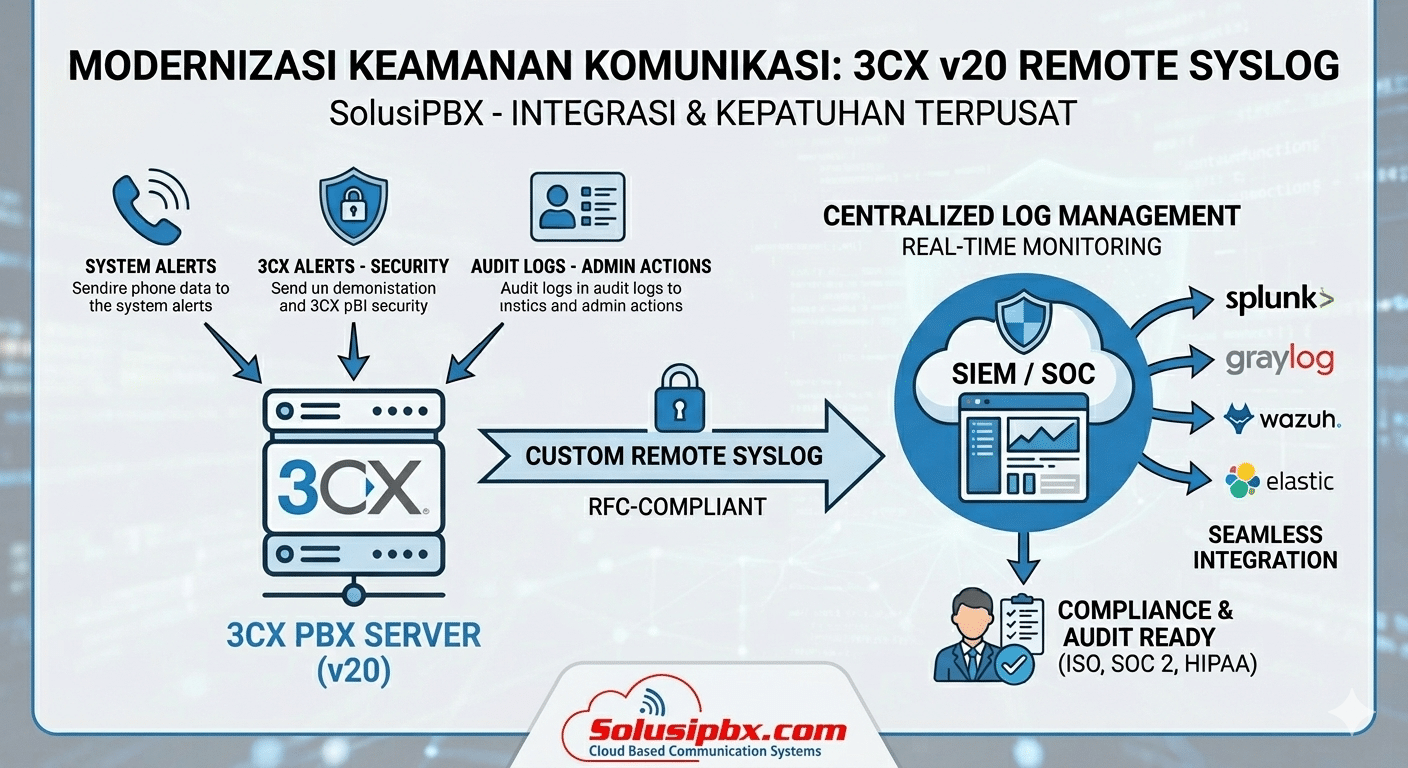
Simply put, the Custom Remote Syslog feature acts as a super-secure automatic courier. This feature lets your 3CX v20 system forward all important event records in real time using industry-standard protocols (RFC-compliant) directly to:
A Centralized Syslog Server on your company’s internal network.
A SIEM (Security Information and Event Management) platform or popular SOC (Security Operations Center) dashboard such as Splunk, Graylog, Wazuh, QRadar, or Elastic.
This way, your Cyber Security team or IT team can monitor and secure communication data from one place together with other server and network logs.
Full Control: Deciding Which Data Must Be Sent for Audit
3CX v20 gives high flexibility so you can filter which data needs to be sent to the central server to save storage capacity. You can enable these three main log categories independently:
Audit Logs (Essential for Compliance): This is the heart of compliance. This feature records all administrative actions in the 3CX Admin Console. Who changed the call routing configuration, when a user’s access rights were changed, and when the system configuration was changed: everything is recorded for total accountability.
3CX Alerts (Security Threat Detection): Sends logs when suspicious activity occurs, such as repeated wrong passwords (brute force attack), or when the system automatically blocks an external IP that tries to break in.
System Alerts (Infrastructure Health): Notifications about server performance status, storage capacity, and PBX service health so operations keep running 24/7 without interruption.
Pass the Audit Without Hassle with SolusiPBX
The Custom Remote Syslog Logging feature in 3CX v20 is an instant answer for IT Managers, CISOs, and Compliance Officers who want to align the company’s communication system with global regulatory standards without having to build complicated manual scripts.
Is your company ready for an audit, or do you want to tighten communication data security?
The SolusiPBX technical team is ready to accompany you from the migration to 3CX v20, through configuring Remote Syslog, to making sure all logs are perfectly integrated into the SIEM/SOC platform your company currently uses.
Do not wait until audit findings appear! Contact the SolusiPBX experts now for a free consultation on strengthening your company’s communication system security.