
The 3CX MCP (Model Context Protocol) Server lets administrators of the 3CX PBX phone system integrate with and control the PBX using AI assistants (such as ChatGPT or Claude) in natural language.
1. The Problem It Solves
PBX administrative and diagnostic tasks often take up a lot of time. The 3CX MCP Server provides a secure, standardized integration path so administrators can manage the system through AI chat without having to jump between menus manually.
2. Key Features & Capabilities
- Natural Language Interaction: Users can ask for PBX data directly (for example: “How many extensions are active?” or “What is the current call queue status?”).
- Administrative Actions: Lets the AI perform certain supported actions, such as logging agents in (log in) or out of queues, setting DIDs, and managing
- calls
- Automatic Analysis & Reporting: AI can process PBX data into weekly reports, agent/queue performance summaries, call recording summaries, and reports on frequently occurring problems
- (common issues).
- Knowledge Extraction (Knowledge Base): Call transcripts can be analyzed by AI to identify frequently asked customer questions. The AI will then create documents
- in Markdown format that can be uploaded to 3CX AI Agent Knowledge Sources.
3. Security and Access Control (Governance)
- OAuth Authorization Based: Connects to the system using authentication
- Enforces Query Access Rights (Role-Based Permissions): The AI only has access according to the permissions of the connected 3CX user account.
- Read-Only Database Query: Direct database operations are limited to SELECT commands only to maintain data integrity.
- Tool Permission Control (Tool Permissions): Administrators can set the AI’s action response to Always allow, Needs approval (ask for confirmation before executing actions that change/delete data), or Deny.
4. How to Enable It (Quick Setup)
- Open the Admin > Integrations > MCP Clients menu in
- Copy the MCP URL that
- Connect that URL to the AI client of your choice (ChatGPT/Claude) using authentication
- Log in using a 3CX user account and set the tool permission level as
Here are the main features offered by the 3CX MCP Server:
- Natural Language-Based Control and Management (Conversational Control)
- PBX Data Q&A: You can ask for PBX system data or status using everyday language to ChatGPT or Claude (for example: “How many extensions are on my PBX?”).
- Executing Administrative Actions: The AI can perform direct actions such as:
- Performing log in or log out of agents from call queues (queue).
- Setting and allocating DID (Direct Inward Dialing) numbers.
- Managing calls in
- Quick Data & Information Search (Instant Insights)
- Searching and checking call recordings (call recordings) and voicemails (voicemails).
- Checking PBX system logs and information
- Searching the list of extensions, contacts, DID numbers, and SIP Trunks status.
- Monitoring the status of active calls and queues in real-time.
- Automated Report Generation (Automated Reporting)
AI can process raw PBX data into various types of structured reports automatically, including:
- Weekly management summaries (Weekly management summaries).
- Agent and queue status reports
- Reports on common problems that often appear (Common-issue reports).
- Call summaries and Reports
- Converting Call Transcripts into an AI Knowledge Base (Knowledge Base Creation)
- Scanning and analyzing call recording transcripts to find the customer questions that appear most often.
- Converting those analysis results into knowledge documents in Markdown format.
- These documents can be put straight into the 3CX AI Agent knowledge base so the AI agent can answer customer questions automatically in the
- Layered Security and Access Control System (Seamless Security & Governance)
- Role-Based Access Rights (RBAC): The AI only has access according to the permission level (permissions) of the connected 3CX user account.
- OAuth Integration: Connection authentication between the AI and the PBX uses the OAuth standard that
- Safe Data Query (Read-Only): Database operations through the query tool are strictly limited to read commands (SELECT), so there is no risk of damaging or changing database contents
- Command Permission Control (Tool-level Control): Administrators can set the permission level for every action the AI will run:
- Always allow (Run immediately).
- Needs approval (Must ask for admin confirmation before executing actions that change/delete data).
- Deny (Not allowed to run).
3CX MCP Server is a “smart bridge” that connects the office phone system (3CX PBX) with AI (such as ChatGPT or Claude).
This means:
- You no longer need to click through complicated menus: Before, if you wanted to check call status, check recordings, or change a staff member’s status, you had to open the 3CX admin dashboard and look for the menu one by one. Now, you can just chat to ChatGPT/Claude in plain language (for example: “Please show me this week’s call summary” or “Take Budi out of the phone queue”).
- AI Can Be Told to Be an Admin Assistant: AI cannot only answer questions about office data, but can also take action directly (such as managing calls or updating data) with your permission.
- Makes the Office AI Smarter: AI can read transcripts of phone conversations between staff and customers, then summarize the questions that come up often. The summary becomes an automatic “handbook” so the 3CX AI Robot can answer customer questions more accurately later on.
- Still Safe: AI cannot just mess around. AI can only see and do things your account permits, and for commands that change/delete data, the AI must ask for your approval first (Needs approval).
In short, your office phone system now has an “AI brain” that you can talk to and command through ordinary chat.
Manage the Office Phone System Simply Through AI Chat Commands
Managing the company phone system (PBX) often becomes administrative work that eats up time. From checking call logs and controlling staff queues to creating monthly performance reports, IT administrators have to navigate many complex menus in the dashboard.
To solve this problem, 3CX has officially launched the 3CX MCP (Model Context Protocol) Server. This new innovation lets system administrators connect their 3CX PBX directly to leading AI platforms such as ChatGPT and Claude.
What Is the 3CX MCP Server?
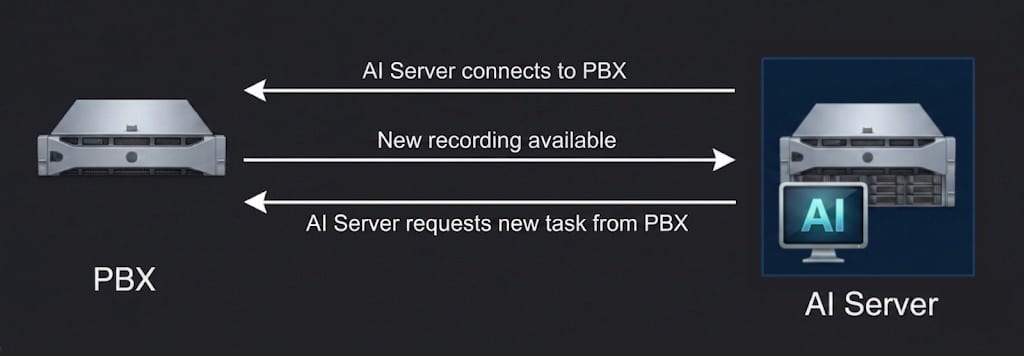
The MCP Server works as a secure, standards-based “communication bridge” that lets artificial intelligence (AI) models read data and carry out actions inside the 3CX phone system. With this integration, PBX supervision tasks are no longer done manually by clicking menus, but simply through natural language commands (conversational AI).
Main Capabilities Offered
The 3CX MCP Server brings a number of features designed to improve the operational efficiency of IT teams and customer service managers:
- Conversation-Based Control: Users can ask questions such as “How many extensions are active right now?” or tell the AI to execute certain actions, such as
- taking an agent out of a call queue and setting a number
- Data Analysis & Automatic Reporting: AI can process call history and queue activity into concise reports, such as weekly executive summaries, agent performance reports, and even analysis of
- problems that are often faced
- Transforming Transcripts into Knowledge Base: The system can analyze phone conversation recording transcripts to identify recurring customer questions. The results can
- be compiled into Markdown-format documents to serve as a knowledge source for the 3CX AI Customer Service Agent.
Layered Security and Access Control
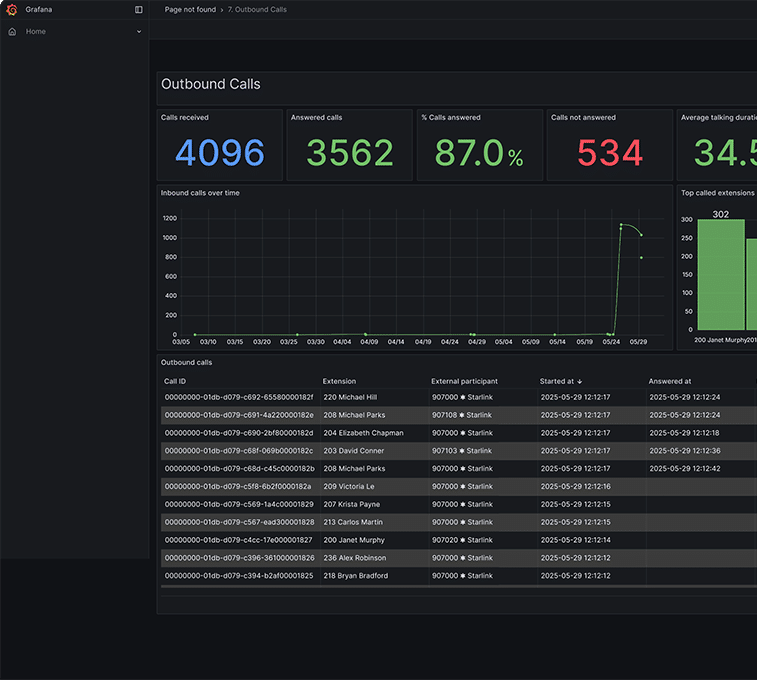
Opening the company phone system to artificial intelligence of course requires extra protection. 3CX designed the MCP Server with strict security governance:
- OAuth Authentication & Role-Based Permissions: The AI’s access is fully tied to the permission level (permissions) of the 3CX user account, so the AI cannot see or change data outside that account’s authority.
- Limited Database Queries (Read-Only): Every data search command to the database is limited to read commands (SELECT) only, preventing the risk of accidental manipulation or deletion of data.
- Action Control (Tool Permissions): Administrators can set the AI’s action response at three levels:
- Always Allow: The action runs immediately
- Needs Approval: The AI must ask for admin confirmation/approval before executing commands that change data.
- Deny: Refuses action execution
Quick Steps to Start the Integration
The 3CX MCP Server configuration process is designed to be quite simple:
- Go to the Admin > Integrations > MCP Clients panel in the system
- Copy the MCP URL link that
- Connect that URL to the AI app of your choice (such as ChatGPT or Claude) using authentication
- Log in using the appropriate 3CX account, set the tool access rights, and the integration is ready