A business phone system is one of the most critical operational services that simply cannot afford downtime. When a PBX server fails, it causes more than just dropped calls—business operations, customer support, and even your brand’s reputation can be severely impacted.
Because of this, relying on a basic 3CX backup alone isn’t enough. What matters far more is having a battle-tested disaster recovery plan in place. That way, when an outage actually occurs, your IT team knows precisely which backup file to restore, where to restore it, which external services need re-verification, and how to validate that full functionality has been restored.
The best time to make these decisions is before a system failure strikes—not in the middle of a panic.
Plan Disaster Recovery from the Start
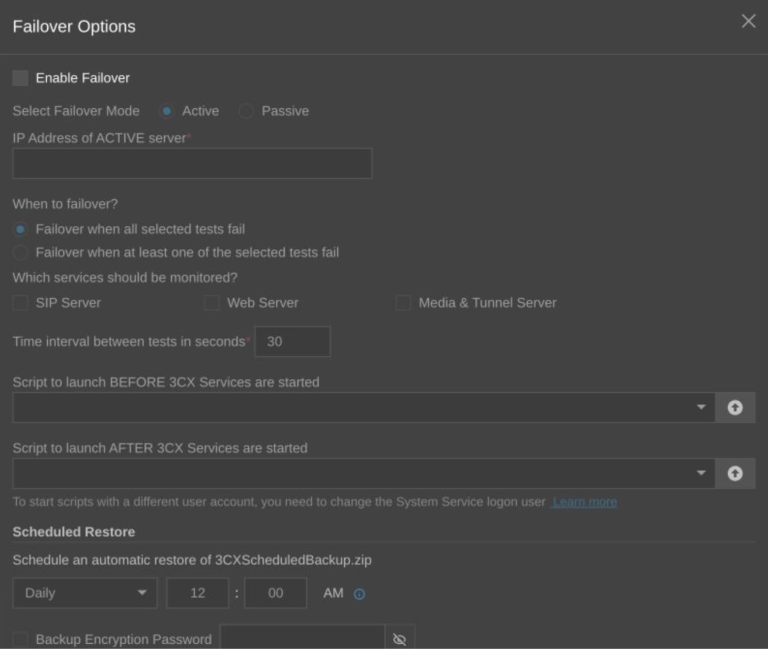
Not every outage warrants the same response. For single-server failures or routine migration tasks, restoring from the most recent backup is usually sufficient. However, if your business demands a much faster recovery time objective, an active-passive failover configuration may be a better fit—provided your deployment architecture supports it.
SIP trunk failover is another mechanism altogether: while it allows your provider to reroute inbound calls when supported, it cannot replace the core PBX recovery process itself.
Before an incident occurs, ensure your organization has clear answers to the following questions:
How quickly must services be restored to normal operations?
What is the maximum acceptable loss of recent configuration or call data?
Which critical services must be recovered first?
Who holds the ultimate authority for making disaster recovery decisions?
Does your recovery strategy rely on backup restores, active failover, or a hybrid approach?
Understand What Lies Outside the Scope of a Backup
A restored PBX still depends on external services beyond 3CX itself. SIP trunk authentication, DNS records, firewall rules, SBCs, SSL certificates, CRM connections, and other third-party integrations may require verification or updates once the restore process completes.
Maintain a simple register documenting these dependencies along with their designated owners. This reference point can save invaluable time if the PBX comes back online but calls or integrations remain non-functional.
Back Up Your PBX and Validate the Restore Process
The critical question isn’t just “Do we have a backup?”—it’s “Can we actually restore our system from that backup when disaster strikes?”
Leverage 3CX’s automated backup scheduler and choose a frequency aligned with your organization’s data loss tolerance. Maintain multiple recovery points and ensure at least one copy is stored offsite, entirely separate from the primary PBX host and failure domain.
Key operational guidelines include:
Schedule automated backups at regular intervals.
Store offsite backup copies in a remote location or cloud storage.
Include call recordings where necessary for compliance.
Securely store encryption passwords separately from the backup files themselves.
Monitor completion notifications for both successful and failed backup jobs.
Test Your Restore Process Before Outages Occur
A successful backup job only proves that a file was created—not that your business can recover from it. Conduct periodic restore tests within a isolated, safe sandbox environment to verify full system functionality. At a minimum, test the following components:
User accounts and extensions
SIP trunks and DID mappings
Inbound and outbound call routing
Call queues, IVRs, and call transfers
Web Clients, mobile apps, and IP desk phones
Critical software integrations
Document the exact time required to complete recovery, along with any manual post-restore adjustments. Repeat this validation whenever major changes occur across your PBX, network infrastructure, SIP trunks, or integrated software to keep your recovery plan up to date.
Restore the Entire 3CX Ecosystem, Not Just the PBX
During an active recovery event, restore services in a structured, phased manner. Begin with the core PBX, then systematically bring online the dependencies users rely on to place and receive calls.
Recommended execution sequence:
Restore the selected backup file onto the target recovery system.
Verify that FQDN, SSL certificates, DNS resolution, and network paths are correct.
Confirm SIP trunk registration status and DID routing rules.
Validate that softphones, IP desk phones, SBCs, and VoIP gateways reconnect properly.
Re-check active integrations, including CRM systems, Microsoft 365, Google Workspace, or SMTP services.
Conduct real-world test calls—inbound, outbound, and internal extension-to-extension.
Note: A healthy Admin Console does not guarantee that the entire communication ecosystem is fully operational.
Validate System Health Before Handing Back to Users
Before declaring a recovery operation complete, test the environment end-to-end from a user’s perspective. Confirm that call routing functions as expected, users can register their devices, queues and IVRs operate properly, and necessary integrations are fully synced. Once verified, take a fresh post-recovery backup and document all changes made during the incident.
Conclusion
A backup gives you something to restore—but a battle-tested recovery plan is what keeps your business communicating. Don’t wait for a system outage to discover whether your 3CX backups are dependable. Establish automated schedules, store offsite copies, and above all, regularly test your restore procedures.
The SolusiPBX team is ready to help you design, implement, and validate a comprehensive 3CX backup and disaster recovery strategy tailored to your business needs—from backup automation and failover configuration to full-scale recovery simulation testing.