



Optimizing Enterprise Collaboration with the 3CX Video Conference API

Updated on September 30, 2026
5 min read
 #
#
1. Introduction #
In the era of hybrid work, video collaboration capability is no longer just a nice-to-have — it’s a core pillar of business operations. Many large companies now face the challenge of offering digital meeting spaces that are not only secure and stable, but also seamlessly integrated with their internal systems — such as CRM, ERP, e-learning platforms, or patient management portals.
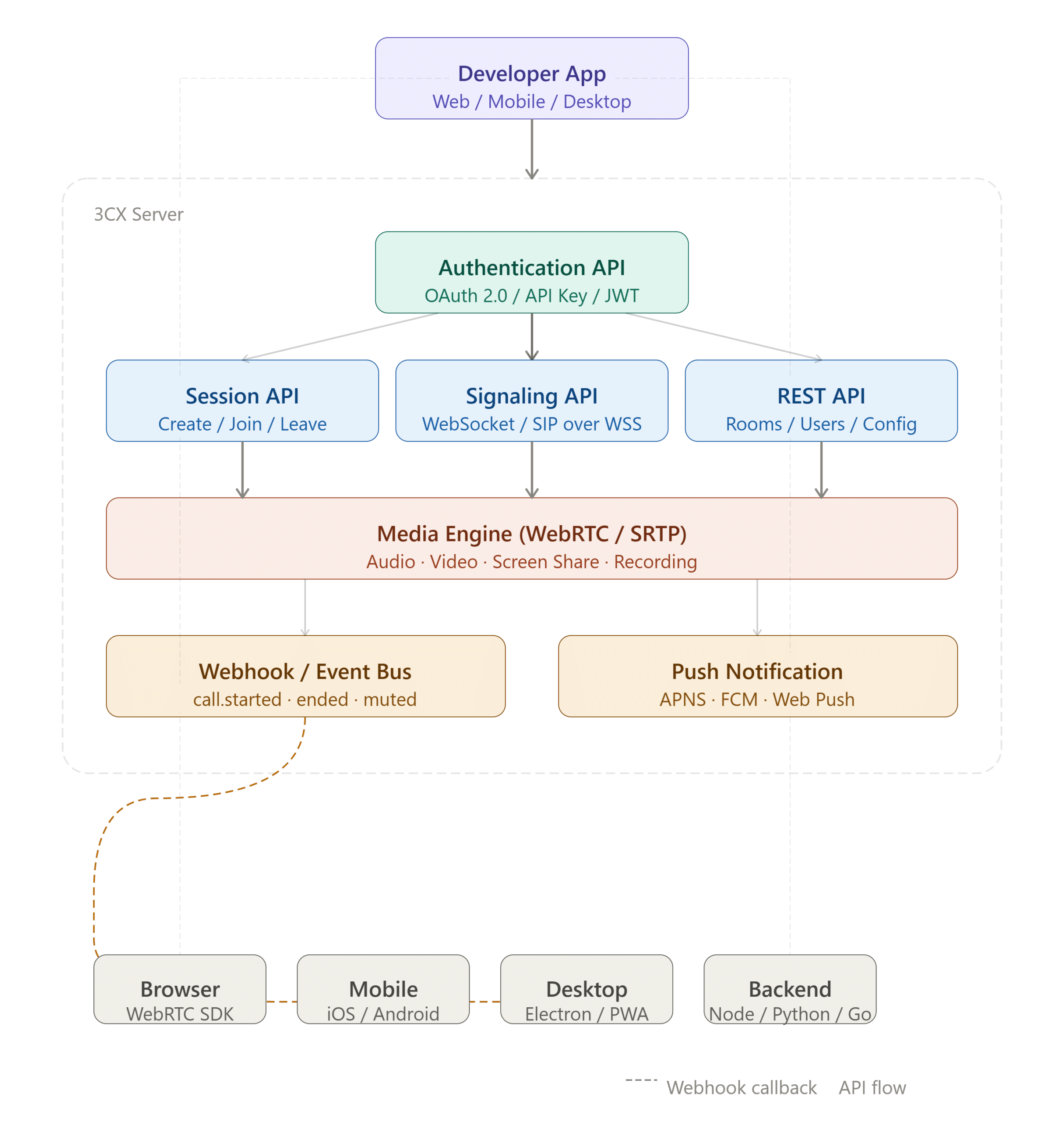
The 3CX Video Conference API is a cutting-edge solution for enterprise development teams. By leveraging the WebRTC (Web Real-Time Communication) technology built deep into 3CX’s core architecture, this API lets companies integrate, automate, and control business-grade video conferencing features directly inside their own workflows and custom applications.
2. What Is the 3CX Video Conference API? #
Technically, the 3CX Video Conference API is a set of programming interfaces that let external applications interact with 3CX’s video conferencing server (v18 and above, and v20).
Unlike public video conferencing solutions that force users to leave the company’s ecosystem to make a call, this API positions 3CX’s video capability as a backend service. Media communication (audio and video) is handled directly by the browser or native app using the WebRTC protocol, powered by 3CX’s own server infrastructure (whether on-premise or cloud-hosted).
3. Core Functions of the 3CX Video Conference API #
This API gives you full programmatic control over the entire lifecycle of a digital meeting room. Here are the core functions developers can take advantage of:
A. Automated Meeting Lifecycle Management #
-
Instant & Scheduled Rooms: Create a video meeting room instantly via code, or schedule one for a specific time in the future.
-
Dynamic Link Generation: Automatically generate unique participant and moderator links (URLs) for every session.
-
Room Disposing: Automatically close, lock, or delete a meeting room after the event ends, to keep server resource usage efficient.
B. Invitation Automation & Calendar Sync #
-
Participant Ingestion: Programmatically feed a list of participant emails into the meeting coordination database.
-
Calendar Payload Integration: Send join instructions to external calendar systems such as Microsoft 365, Google Workspace, or an internal company calendar.
C. Meeting Room Configuration Control (Room Customization) #
-
Default Profile Setting: Set the meeting room’s mode right from the moment it’s created via the API (for example: Classroom mode, where all attendees are automatically muted, or Open Discussion mode).
-
Feature Toggling: Programmatically enable or disable specific features such as screen sharing permission, chat access, recording, or whiteboard options.
D. Post-Meeting Data Extraction (Post-Meeting Analytics) #
-
Attendance Logs: Pull statistics on who attended the meeting, when they joined, and how long they stayed.
-
Recording Management: Get the path or download URL for the meeting’s recorded video file stored on the server, so it can be automatically archived to the company’s cloud storage (such as Google Drive or AWS S3).
4. Use Cases and Enterprise Application Scenarios #
Integrating the 3CX Video Conference API creates a transformative impact across a number of large-scale industries:
1. Healthcare (Telemedicine / Telehealth) #
Hospitals can integrate this API into their patient portal application. When a patient schedules an online consultation with a doctor through the mobile app, the system automatically creates a private 3CX video meeting room. Patients and doctors can meet face to face directly inside the hospital’s app without needing to install any third-party app, keeping medical data confidential in line with industry regulations.
2. Education & Training (LMS Integration) #
Large companies with thousands of employees often run their own internal Learning Management System (LMS). With this API, creating digital training classes, new-hire orientation sessions, or corporate webinars can be scheduled automatically by the LMS. Employee attendance data from the video conference can be pulled directly by the API to update training module completion status in real time.
3. Banking & Finance (Virtual Branch) #
Banks can offer a “Virtual Branch” service. Premium customers who need an investment consultation or want to open a special account can trigger an encrypted video call directly from within their internet banking app. The API ensures the session runs securely inside the bank’s private network, with SRTP/DTLS encryption enforced.
4. Helpdesk & Customer Support Optimization (Omnichannel) #
Connect the video API to a ticketing system such as Zoho Desk, Salesforce, or a custom helpdesk. When an advanced support agent runs into a complex customer technical issue, they can click a single button in the CRM to generate a 3CX video conference link and send it to the customer via WhatsApp or SMS for a remote visual walkthrough session.
5. Architectural Advantages for an Enterprise IT Team #
Why do companies choose to integrate the 3CX Video API instead of a pure video SaaS platform?
-
Full Data Sovereignty: Because the 3CX server sits on the company’s own infrastructure (on-premise or private cloud), all conversation, video, chat, and recording data never leaves the company’s security perimeter. This is critical for data regulation compliance (such as GDPR or local regulations).
-
Significant Cost Efficiency: Most video SaaS platforms charge on a “per user, per month” basis. With 3CX, video capacity is based on the simultaneous call licenses the company already owns, eliminating the variable costs that spike as the user base grows.
-
Built on Standard WebRTC: No executable file (.exe/.pkg) installation needed on the user’s device. Calls run smoothly and natively in Google Chrome, Mozilla Firefox, Microsoft Edge, and Apple Safari.
6. Conclusion #
The 3CX Video Conference API is more than just a tool for making video calls — it’s a strategic instrument for companies to build an independent, secure, and deeply integrated communication ecosystem. By automating the meeting room lifecycle and weaving it into core business applications, enterprises can boost productivity, cut operational costs dramatically, and deliver a premium, reliable user experience.